Burner vs. Alias: Technical Email Deep Dive
Deep Dive: The Technical Difference Between a 'Burner' Email and a ‘Forwarding Alias’
Introduction: The Two Pillars of Email Privacy
In the quest for digital privacy, users often encounter two primary tools designed to shield their main inbox: the Burner Email (also known as Temporary or Disposable Email) and the Forwarding Alias (also known as Masked Email). While both aim to prevent the exposure of a user's primary email address, their underlying technical architecture, security implications, and use cases are fundamentally different. Confusing the two can lead to significant privacy and security compromises.
This article provides an E-E-A-T-focused, technical deep dive into the mechanics of these two privacy tools. We will dissect the server-side processes, the data flow, and the security trade-offs of each, positioning the temporary email as the superior choice for true ephemeral pseudonymity and spam isolation.
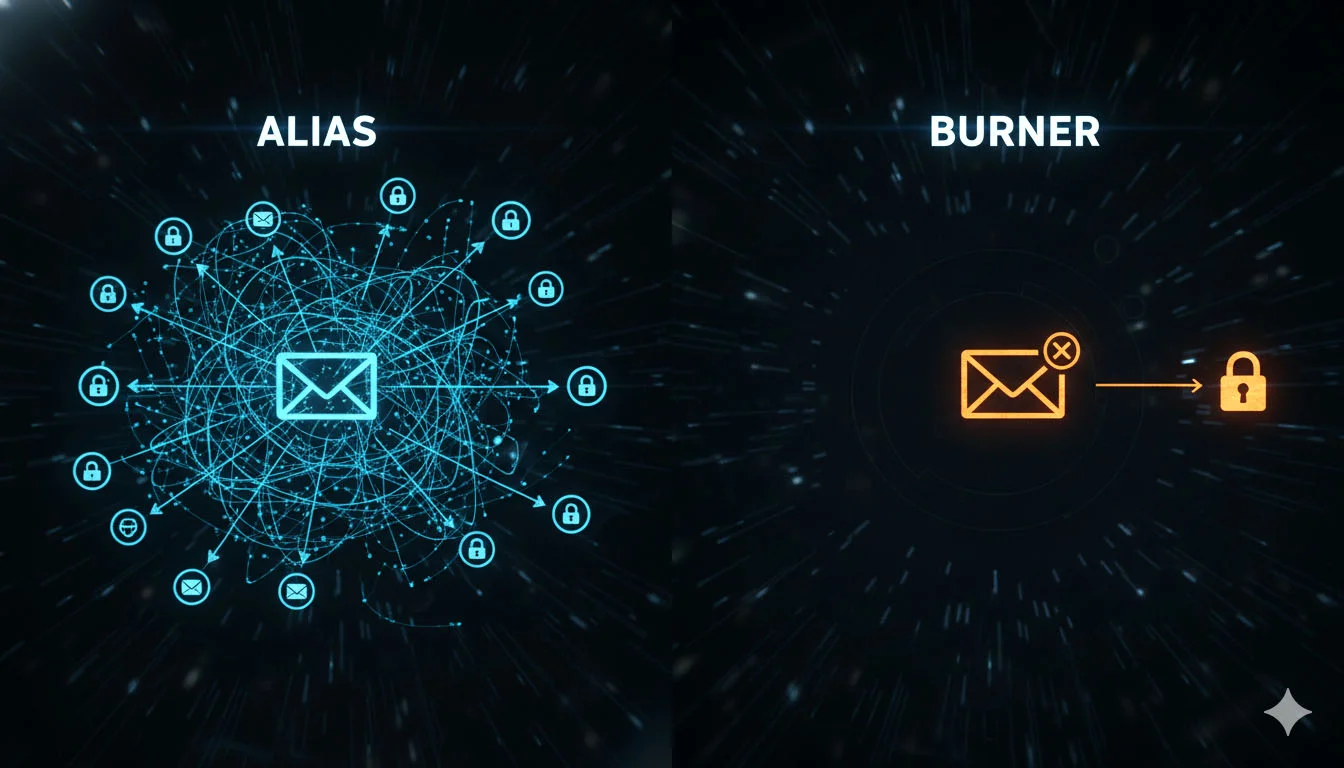
The Core Distinction: Lifespan and Data Flow
The most critical difference lies in the lifespan and the data flow mechanism:
Part I: The Technical Architecture of a Burner Email
A burner email service operates as a completely isolated, self-contained email system designed for transience.
1. The Isolated Inbox
When a user generates a burner email (e.g., xyz123@tempmailmaster.io), the service instantly creates a dedicated, server-side mailbox for that address.
- No Forwarding: Crucially, there is no forwarding mechanism to the user's real email address. The mail stays within the temporary service's infrastructure.
- Direct Access: The user accesses the content of this temporary inbox directly, typically via a unique URL or a session ID. This isolation is the core of its security model.
2. The Ephemeral Protocol
The burner email is governed by a strict, automated expiration protocol.
- Time-to-Live (TTL): The address is assigned a TTL (e.g., 72 hours [1]). Once this time expires, the address is deactivated, and the mailbox is securely wiped from the server (as detailed in our security audit [2]).
- Secure Deletion: The secure deletion process is vital. A privacy-focused burner service employs a secure overwrite protocol to ensure that the data is unrecoverable, fulfilling the spirit of the Right to Be Forgotten [3].
3. Use Case: High-Risk, Low-Value Interactions
Burner emails are best suited for interactions where the user needs to receive a single, immediate message (like a verification link) and then wants the identity to vanish.
- Examples: Free Wi-Fi sign-ups [4], one-time downloads, forum registrations, and testing a website's sign-up flow.
Part II: The Technical Architecture of a Forwarding Alias
A forwarding alias service operates as a server-side redirect that sits in front of the user's primary inbox.
1. The Server-Side Redirect
When a user creates an alias (e.g., amazon-2025@alias.com), the alias service registers this address and maps it to the user's real email (realuser@gmail.com).
- Data Flow: When a sender sends an email to the alias, the alias service receives it, rewrites the recipient header to the real address, and then forwards the email to the user's primary mail server.
- Reply Mechanism: Most alias services also offer a reply mechanism. When the user replies from their primary inbox, the alias service intercepts the outgoing mail and rewrites the sender header back to the alias, masking the real address from the recipient.
2. The Persistent Nature
Unlike burner emails, aliases are designed for persistence.
- Manual Control: The alias remains active until the user manually deactivates it. This persistence is necessary for long-term accounts where the user needs to receive ongoing communication (e.g., a subscription service).
- Single Point of Failure: Because all aliases forward to a single primary address, the security of the entire system is dependent on the security of the primary inbox.
3. Use Case: Identity Masking and Breach Tracking
Aliases are best suited for long-term interactions where the user needs to maintain a consistent identity but wants to mask their primary address.
- Examples: Online shopping accounts, social media profiles, and long-term subscriptions.
Part III: Security and Privacy Trade-Offs
The technical differences lead to distinct security and privacy trade-offs.
1. Spam and Phishing Isolation
2. Data Breach Exposure
The exposure risk is the most critical differentiator.
- Burner Email: If a service signed up with a burner email is breached, the exposed email is the temporary one. Since the temporary inbox is already wiped, the breach has zero impact on the user's primary identity.
- Forwarding Alias: If a service signed up with an alias is breached, the exposed email is the alias. While the primary address is masked, the alias is permanent. The user must then manually deactivate the alias to stop the flow of spam and phishing attempts to their primary inbox.
3. Trust Model
- Burner Email: The user must trust the burner service to securely wipe the data after expiration.
- Forwarding Alias: The user must trust the alias service to handle all their email traffic (both incoming and outgoing) securely and to never log or expose the mapping between the alias and the primary address. This creates a single point of trust for all masked identities.
Part IV: The Hybrid Strategy for Ultimate Privacy
For the ultimate privacy and security posture, users should adopt a hybrid strategy, leveraging the strengths of both tools.
Internal Link Strategy: The decision of which tool to use is a matter of contextual integrity, a concept we explored in the argument for the Right to Pseudonymity [6].
Valuable FAQ: Questions on Burners and Aliases
Q1: Can I reply to an email received in a burner inbox?
A: Generally, no. Most true burner email services are designed for receive-only functionality to maintain maximum simplicity and security. The goal is to receive a single verification and then disappear. Attempting to reply would often expose the temporary service's IP address, which is not the intended use case.
Q2: Are email aliases safer than using my primary email?
A: Yes, an email alias is significantly safer than using your primary email directly. It provides a layer of masking that protects your primary address from being exposed in data breaches and reduces the direct flow of spam. However, it is less secure than a burner email for high-risk, temporary interactions because the alias is permanent and forwards directly to your primary inbox.
Q3: What is the main technical challenge for alias services?
A: The main technical challenge is the sender header rewrite. When you reply to an email using an alias, the service must flawlessly rewrite the sender address from your primary email back to the alias. Any technical error in this process can accidentally expose your primary email address to the recipient.
Q4: Why do some websites block burner emails but allow aliases?
A: Websites block burner emails because they are associated with high-volume, short-term use, which is often linked to fraud, abuse, or exploiting free trials. They may allow aliases because aliases are typically permanent and are associated with a single, long-term user, making them less of a risk for bulk abuse.
Q5: If a burner email is public, how is that secure?
A: The security of a burner email is not in its secrecy, but in its ephemeral nature and isolation. The inbox is often public, but it is only active for a very short time. Once the TTL expires, the inbox is wiped. The security comes from the fact that the public inbox is never linked to your private, primary identity, and the data is automatically destroyed.
Conclusion: Choosing the Right Tool for the Job
The technical landscape of email privacy offers powerful tools, but they must be understood and used correctly. The Burner Email is the ultimate tool for spam isolation and ephemeral identity, designed to vanish without a trace after a single, high-risk interaction. The Forwarding Alias is the tool for identity masking and long-term breach tracking, designed to persist and redirect.
For the privacy-conscious user, the choice is not one or the other, but knowing when to deploy each. By leveraging the isolation of the burner email for temporary needs and the persistence of the alias for long-term accounts, users can construct a robust, multi-layered defense that ensures their primary email remains the secure, private hub of their digital life.
References
[1] TempMailMaster.io Blog. (2025). Case Study: The 72-Hour Lifespan of a Disposable Email Address. [Internal Link: /blog/72-hour-lifespan-case-study] [2] TempMailMaster.io Blog. (2025). The Security Audit: What Happens to Your Data When a Temp Mail Expires?. [Internal Link: /blog/security-audit-data-deletion] [3] TempMailMaster.io Blog. (2025). GDPR, CCPA, and Temp Mail: The Right to Be Forgotten vs. Service Abuse. [Internal Link: /blog/gdpr-ccpa-temp-mail] [4] TempMailMaster.io Blog. (2025). The Hidden Dangers of Free Wi-Fi Sign-Ups: A Legal Perspective on Data Harvesting. [Internal Link: /blog/free-wifi-dangers] [5] Krebs on Security. (2022). The Security Pros and Cons of Using Email Aliases. [Source Link: https://krebsonsecurity.com/2022/08/the-security-pros-and-cons-of-using-email-aliases/] [6] TempMailMaster.io Blog. (2025). The 'Right to Pseudonymity': A Philosophical and Practical Argument for Disposable Email. [Internal Link: /blog/right-to-pseudonymity] [7] TempMail.so Blog. (2024). Temporary Emails vs. Email Aliases: Understanding the Difference. [Source Link: https://tempmail.so/blog/temporary-emails-vs-email-aliases-understanding-difference] [8] Mailbox.org. (Unknown). What is an alias and how do I use it. [Source Link: https://kb.mailbox.org/en/private/e-mail/what-is-an-alias-and-how-do-i-use-it/]
Written by Arslan – a digital privacy advocate and tech writer/Author focused on helping users take control of their inbox and online security with simple, effective strategies.