Malware, Viruses, Ransomware: What's the Difference?
Malware vs Viruses vs Ransomware: Understanding Digital Threats in Plain English
If you've ever wondered whether that suspicious email contains a "virus" or "malware," you're not alone. These cybersecurity terms get thrown around constantly, often incorrectly, leaving many of us confused about what we're actually protecting ourselves against. Let's clear up the confusion once and for all.
Why Understanding These Threats Matters Now More Than Ever
Here's a sobering reality check: cybercrime is expected to cost the world a staggering $10.5 trillion annually by 2025. That's more money than the entire illegal drug trade worldwide. With new malicious software appearing literally every few seconds, knowing your enemy isn't just smart—it's essential for surviving in our digital world.
The problem? Most people think "virus" and "malware" mean the same thing. This misunderstanding isn't just semantic—it can leave you vulnerable to attacks you didn't see coming. Let's fix that knowledge gap right now.
Malware: The Big Picture
Think of malware as the crime family of the digital world. The term "malware" (malicious software) is the umbrella that covers every type of software created to harm, infiltrate, or mess with your computer systems. It's like saying "criminal"—there are many types, but they all have bad intentions.
What Makes Something Malware?
- It sneaks around without your permission
- It exploits weaknesses in your system
- It might multiply, hide, or destroy your files
- It typically arrives through sketchy emails, infected websites, or compromised downloads
- It includes everything from viruses to ransomware to spyware
Red Flags You Might Have Malware:
Your computer suddenly runs like it's from 1995, crashes constantly, shows weird network activity, changes your browser settings without asking, or displays programs you never installed. Spot these signs early, and you might save yourself a massive headache.
Computer Viruses: The Classic Troublemaker
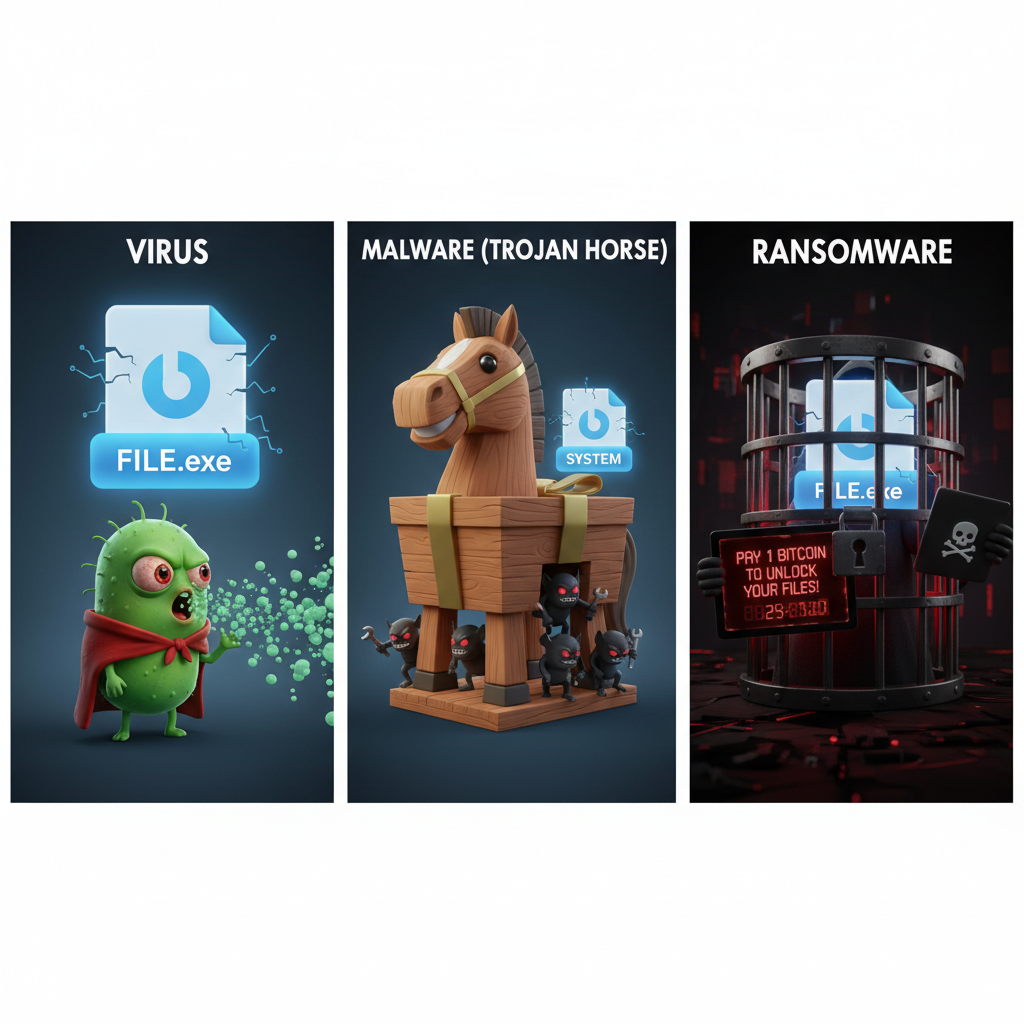
Remember how COVID spreads from person to person? Computer viruses work similarly—they need a "host" to survive and human interaction to spread. A virus attaches itself to normal files or programs, then spreads when you share those files or run those programs. The key difference? Viruses can't spread on their own without you accidentally helping them.
How Viruses Actually Work:
- They latch onto your files like a parasite
- They wait quietly until you open the infected file
- Once activated, they make copies of themselves
- They spread through your system and to other files
- They travel via USB drives, email attachments, or file sharing
Fun fact: The concept of computer viruses goes back to the 1970s, and the first real one, called "Creeper," showed up in 1971. Today's viruses are infinitely more sophisticated, constantly changing their code to avoid detection like digital shapeshifters.
Ransomware: The Digital Kidnapper
Imagine someone breaking into your house, locking all your belongings in unbreakable safes, then demanding money for the combinations. That's essentially what ransomware does to your digital files. This particularly nasty malware encrypts your data and demands payment (usually in cryptocurrency) to unlock it.
The Ransomware Attack Playbook:
- Entry: Usually through a phishing email you thought was legitimate
- Installation: Sets up shop in your system
- Exploration: Looks for valuable files and connected systems
- Encryption: Locks everything it can find
- Ransom Note: Demands payment, often with a ticking clock
- Double Trouble: Modern ransomware might also steal your data and threaten to publish it
The scary evolution? Cybercriminals now use "double extortion"—they encrypt your files AND threaten to leak sensitive data publicly. Some even add "triple extortion" by threatening to attack your customers or launch additional cyberattacks if you don't pay up.
Breaking Down the Key Differences
Let's make this crystal clear:
Category Level:
- Malware: The whole criminal family
- Virus: A specific family member that needs help spreading
- Ransomware: The family member that takes hostages
Their Goals:
- Malware: Could want anything—your data, system access, or just chaos
- Virus: Wants to multiply and usually damage things along the way
- Ransomware: Wants your money, plain and simple
How They Spread:
- Malware: Every trick in the book—downloads, emails, USB drives, network vulnerabilities
- Virus: Needs you to open infected files
- Ransomware: Often targets you specifically through convincing phishing emails
The Damage They Cause:
- Malware: Ranges from annoying pop-ups to complete system destruction
- Virus: Corrupts files, slows everything down, causes crashes
- Ransomware: Immediate business shutdown, potential total data loss
Your Defense Strategy: Practical Protection That Actually Works
The Essentials (Do These Today):
- Keep your antivirus updated and running—set it and forget it
- Turn on automatic updates for everything—yes, even when it's inconvenient
- Follow the 3-2-1 backup rule: 3 copies of important data, on 2 different storage types, with 1 kept offline
- Use unique, strong passwords with two-factor authentication everywhere
- Train everyone who uses your network—your security is only as strong as your least careful user
Level-Up Your Security:
- Install endpoint detection that watches for suspicious behavior
- Use email filtering that quarantines sketchy attachments
- Set up application whitelisting—only approved programs can run
- Create and practice an incident response plan before you need it
- Keep offline backups specifically for ransomware recovery
When Things Go Wrong: Your Recovery Roadmap
Immediate Actions:
- Disconnect infected devices immediately—pull the network cable if you have to
- Figure out what hit you—different threats need different responses
- Document everything—screenshots, timestamps, ransom notes
- Check how far the infection spread
- Decide: clean it, restore from backup, or start fresh?
After the Crisis:
- Run a full security audit to find weak spots
- Update your security policies based on what happened
- Improve your detection systems
- Test your backup recovery process
- Consider cyber insurance—it's becoming essential
Looking Ahead: The Future of Cyber Threats
The cybersecurity landscape is evolving rapidly. Artificial intelligence is being weaponized by both attackers and defenders. The Internet of Things means your smart fridge could become an attack vector. Quantum computing might eventually crack current encryption methods like they're made of paper.
The solution? Stay proactive. Adopt zero-trust security models, invest in automation, and build a culture where everyone takes security seriously.
The Bottom Line
Understanding the difference between malware, viruses, and ransomware isn't just tech trivia—it's practical knowledge that helps you implement the right defenses. These threats are constantly evolving, becoming more sophisticated and damaging, but you're not helpless.
Remember: cybersecurity isn't a one-time fix. It's an ongoing process that requires vigilance, education, and the right tools. By staying informed, implementing solid security practices, and preparing for incidents before they happen, you can dramatically reduce your risk in our increasingly connected world.
Stay safe out there, and remember—when it comes to cybersecurity, a little paranoia is actually healthy.
Helpful Resources:
- CISA Cybersecurity Best Practices
- NIST Cybersecurity Framework
- SANS Internet Storm Center
- US-CERT Security Publications
Last updated: 2025 | Stay informed about the latest cybersecurity threats and protection strategies.
Written by Arslan – a digital privacy advocate and tech writer/Author focused on helping users take control of their inbox and online security with simple, effective strategies.